

Fractal Circle User Manual
What is Fractal Circle?
Fractal Circle is a collaborative decision-making tool that helps groups of people discuss ideas, vote on proposals, and select representatives through multiple rounds of discussion—all within Telegram.
Think of it as a “fractal” because the structure repeats: small discussion circles eventually distill down to the most important ideas and the people who should represent them.
How It Works: The Journey
Step 1: You Get an Invite
Someone invites you to join a Fractal Circle meeting on a specific topic. You’ll receive an invite message on Telegram with a link to join.
What to do: Tap the link and confirm you want to participate. You’re now part of the Fractal!
Step 2: The Fractal Starts
When the organizer launches the meeting, Telegram sends you a message saying:
🚀 Fractal ‘[Topic]’ has started!
👥 You’re in a Circle with [X] other members
💬 Chat with your Circle members in this private group chat
📝 Open the Dashboard to make proposals and vote
Step 3: You’re in Your First Circle
You’re now part of a Circle—a small group (typically 4-8 people) who will discuss the topic together.
Two things happen:
- A private Telegram group chat opens where you can chat with your Circle members
- You can open the Dashboard (a web app) to propose ideas and vote
Inside the Dashboard: Round 1
Phase A: Proposal & Discussion Phase (First Half of Round)
For the first half of the round time, you and your Circle focus on:
📝 Making Proposals
- Click “+ New Proposal” to add your idea
- Give it a title and detailed description
- Hit “Post”—it’s now visible to your Circle
Example proposal:
- Title: “Weekly team standups on Monday mornings”
- Description: “Brief 15-minute sync to align on priorities and blockers…”
💬 Adding Comments
- All proposals will be shown one at a time on the Dashboard
- Add comments to refine the idea, ask questions, or add details
- You can add comments throughout the entire round—even during voting phase
⭐ Voting on Comments (1-3 Stars)
- Each comment gets a star rating:
- ⭐ = “Interesting point”
- ⭐⭐ = “Good observation”
- ⭐⭐⭐ = “Excellent point”
- This helps the group identify the most valuable feedback
Phase B: Voting Phase (Second Half of Round)
Important: About halfway through the round, you’ll get a Telegram message:
ℹ️ Half of the time for this round is over
Now is the time to vote on all proposals and select a group representative
When this happens:
- No new proposals can be created
- Comments are still welcome—keep discussing!
- Focus shifts to voting
🗳️ Voting on Proposals (1-10 Score)
You vote on all proposals in your Circle by giving each one a score:
- 1-3: Interesting idea, but not a priority
- 4-6: Worth considering
- 7-8: Strong idea, should move forward
- 9-10: Excellent—definitely should continue to next round
How voting works:
- Read the proposal
- Click the scoring stars (1-10)
- Your vote is recorded instantly
- You can change your vote anytime before the round closes
What happens to your votes:
- The system ranks all proposals by their average scores
- The top 2 proposals from your Circle move to the next round
- Low-scoring proposals are archived
🥇 Voting for Your Circle Representative
Near the end of the voting phase, you select who should represent your Circle in the next round.
How it works:
You have 3 points to allocate:
- 🥇 Gold (3 points) – Your top choice
- 🥈 Silver (2 points) – Your second choice
- 🥉 Bronze (1 point) – Your third choice
Who can you vote for?
- Anyone in your Circle except yourself
What happens:
- Votes are tallied
- The person with the most points becomes your Circle’s representative
- If there’s a tie, the system picks the representative
Round 1 Ends
When the round timer expires:
ℹ️ The round has ended!
The system automatically:
- ✅ Calculates final proposal scores
- ✅ Selects your Circle’s representative
- ✅ Prepares the next round
Round 2+ (If There Are More Circles)
If there are other Circles, a Round 2 begins.
Who Participates in Round 2?
Only representatives from Round 1 Circles move forward. You’ll see a Telegram message:
🚀 The Next Round has started!
⚡ You have been selected to represent your Circle!
If you weren’t selected as a representative, the Fractal journey ends for you—but you can still view the final results later.
What’s Different in Round 2?
For representatives:
- You’re now in a new Circle with representatives from other first-round Circles
- The top 2 proposals from your old Circle are automatically in this new Circle
- You cannot create new proposals ❌
- You can add comments to existing proposals ✅
- You vote on proposals (1-10 scoring) ✅
- You vote for a new representative (Gold/Silver/Bronze) ✅
The round structure is identical to Round 1, just with pre-selected proposals.
Rounds Continue Until One Circle Remains
The fractal keeps dividing like this:
Round 1:  8 Circles of 8 people each (64 people)
           → Top 2 proposals per Circle = 16 proposals

Round 2:  8 Representatives (from 8 Circles) = 1 new Circle
           → Top 2 proposals from R2 = 2 proposals

Round 3:  1 Representative from Round 2
           → Fractal ends (only 1 person left)
The exact number of rounds depends on your Circle sizes and how many people participated.
The Final Results
When the Fractal ends, you’ll see the Results Page:
What’s Displayed:
🏆 Top Ideas (Ranked by Score)
All proposals that made it to the final round, sorted by their total vote score
Each proposal shows:
- Title & Description
- Final Score (sum of all votes from all rounds)
- Top Comments (highest-rated ones—low-scored comments are hidden)
Example:
🥇 "Weekly team standups on Monday mornings"
   Score: 87/10

💬 Top Comments:
"This would really help sync across timezones" ⭐⭐⭐
"Consider async updates too for remote teams" ⭐⭐
🎖️ Circle Representatives
The final Circle’s members and their selection journey:
- Shows who was selected to represent at each round
- Their vote counts from the representative selections
Dashboard Features
**💬 Chat **
- Private Telegram group chat with your Circle
- This conversation is private and will not be stored.
- Stay on topic—focus on the proposals!
📊 Dashboard Buttons & Navigation
Proposal Cards:
- See all comments and votes
- Add your own comment
- Cast your vote
Rep Voting Card:
- Shows Circle members
- Shows final representatives and their medals (at the end)
- Allocate your Gold/Silver/Bronze votes here
Tips for Great Participation
Before the Round Starts
✅ Read the Fractal topic carefully
✅ Think about what matters most to you
✅ Introduce yourself in the Circle chat
✅ Share your ideas and get some feedback.
During Proposal Phase
✅ Ask clarifying questions in comments
✅ Build on others’ ideas
✅ Rate comments that add real value
✅ Keep proposals focused and specific
✅ Use clear language—avoid jargon
During Voting Phase
✅ Vote on all proposals
✅ Vote based on merit, not friendship
✅ Think about what’s truly best for the group
✅ Be fair—use the full 1-10 scale
✅ Choose your representative for their integrity and understanding, not popularity
General Best Practices
✅ Stay respectful and constructive
✅ Listen to different perspectives
✅ Vote honestly—it matters!
✅ Don’t spam or post off-topic messages
✅ If you disagree, use comments to explain your thinking
Common Questions
Q: What if I miss the voting phase?
A: Votes are tallied automatically when the round ends. You can still vote right up to the last minute. But try not to wait—vote early so you don’t miss the deadline!
Q: Can I change my votes?
A: Yes! You can change your proposal votes anytime before the round closes. For representative voting, you can update your Gold/Silver/Bronze allocation.
Q: What if my proposal doesn’t make the top 2?
A: Only the top 2 proposals advance to the next round. But your comments and ideas may have influenced other proposals—that’s how Fractals work! The best ideas rise to the top across all proposals.
Q: Can I see who voted for whom?
A: No, voting is anonymous. You can’t see other people’s individual votes—only the final scores and results. (Full vote information is stored in the database)
Q: What if I’m a representative in Round 2—do I have to participate?
A: You’re expected to! Representatives carry the voice of their Circle forward. If you can’t make it, let the organizer know ASAP.
Q: How are ties broken?
A: If two proposals or candidates have the same score, the system uses a tiebreaker (e.g., who got more votes, or a random selection). The organizer will explain their specific tiebreaker rules.
Q: Can I go back and see old rounds?
A: Yes! After the Fractal ends, you can view the history of all rounds, proposals, and voting. This creates a transparent record of the decision-making process.
Q: What if someone is rude or off-topic?
A: Report it to the Fractal organizer. They can moderate or remove disruptive members. The fractal is also self-organising and disruptive members will unlikely go the a second round.
Accessibility & Technical
Supported Devices
- ✅ Mobile (iOS/Android) – Telegram web app
- ✅ Desktop (Mac/Windows) – Telegram web app
Telegram Setup
- You must have Telegram installed or use Telegram Web
- Automatic login via the “Dashboard” button in Telegram
- No separate password needed
Before You Start
Pre-Fractal Checklist
- Join the Telegram group invite
- Read the Fractal topic description
What to Expect Timewise
Quick Decision (20-30 minutes per round):
- For fast feedback or smaller groups
- Example: Weekly team priorities
Standard Decision (1-2 hours per round):
- For team meetings or group decisions
- Example: Product feature prioritization
Deep Deliberation (1-3 days per round):
- For major organizational decisions
- Example: Company strategy or policy changes
The organizer sets the round duration at the start—you’ll be told how long each round lasts.
Privacy & Data
- Your votes are private – No one sees who you voted for
- Your messages in the group are shared with Circle members
- Proposals and comments are visible to your Circle only
- Final results are visible to all Fractal participants
- Data is kept until the organizer deletes the Fractal
Getting Help
During the Fractal:
- Ask the Fractal organizer for help
- Message in your Circle chat if confused about a proposal
- Check this manual for how features work
Technical Issues:
- Refresh the web app page
- Re-open Telegram and tap Dashboard again
- Contact the organizer if problems persist
Summary: Your Fractal Journey
- ✅ Join → Get added to a Circle
- ✅ Propose & Discuss → Share ideas, add comments, rate feedback
- ✅ Vote → Score proposals (1-10), choose a representative (Gold/Silver/Bronze)
- ✅ Advance (if selected) → Move to next round
- ✅ Repeat → Until final results
- ✅ View Results → See winning ideas and decision history
The goal: Leverage the wisdom of the whole group to surface the best ideas and select thoughtful representatives at each level.
Last Updated: January 2026
Version: 1.0
For questions or feedback about this manual, contact your Fractal organizer. www.fractalcircles.org.
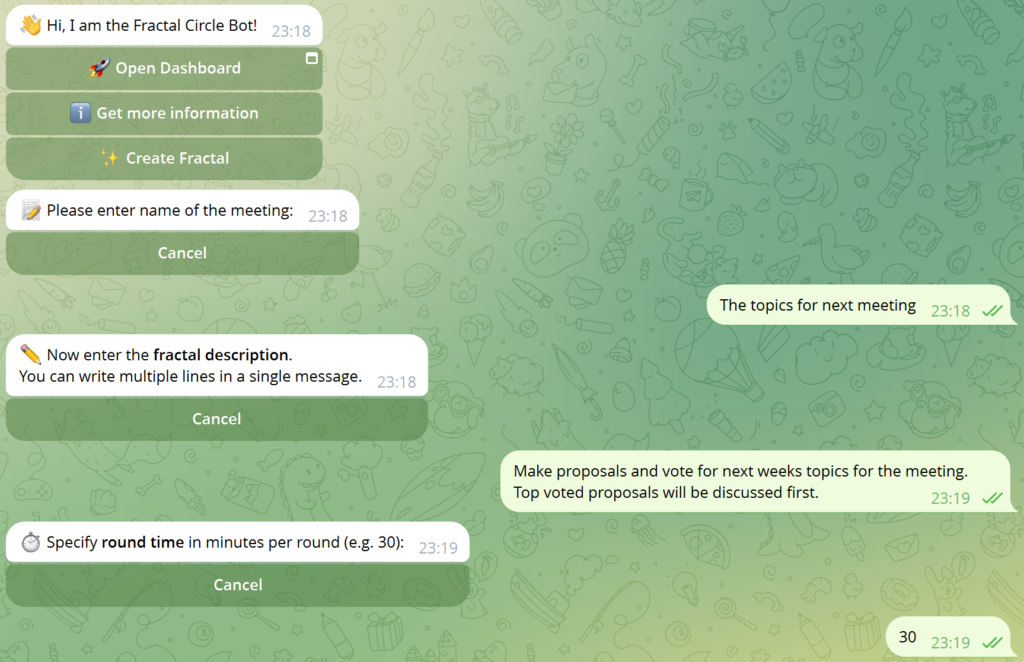
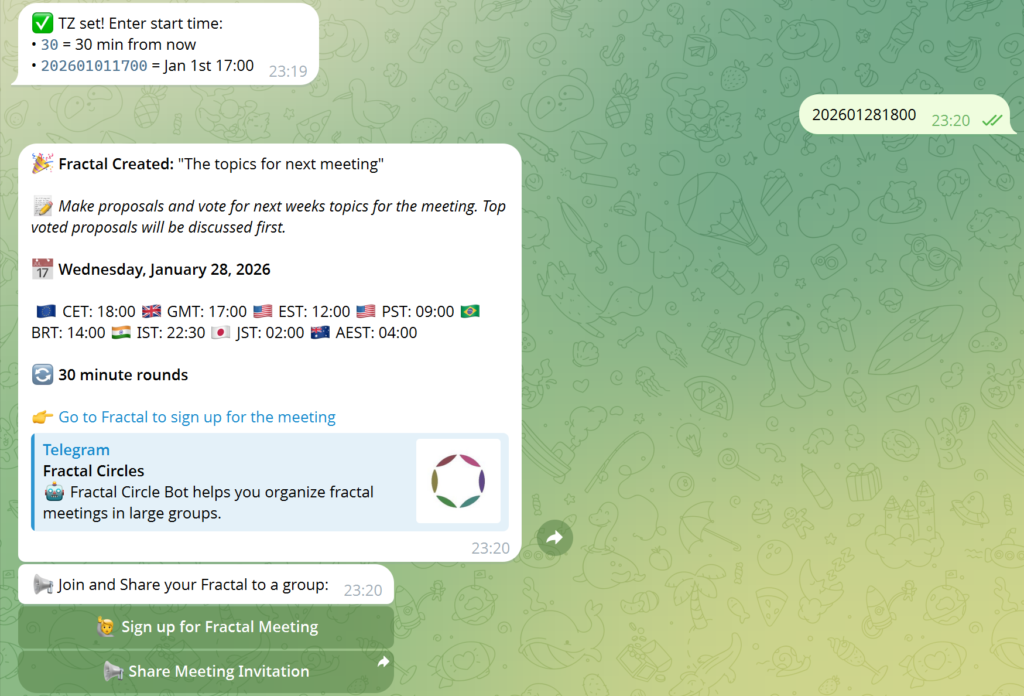
How to create a meeting

Los comentarios están cerrados.